
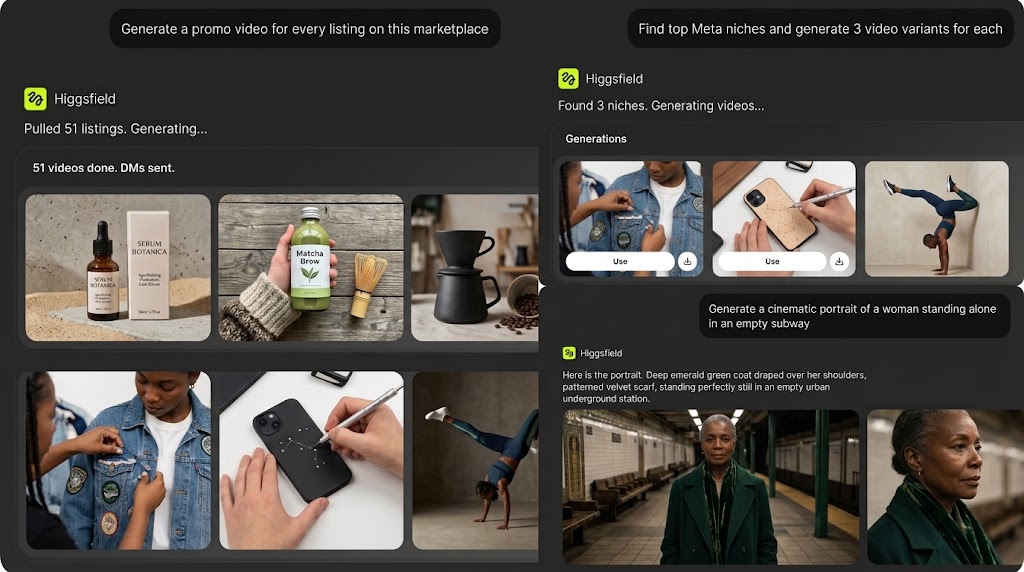
Claude can now generate finished AI video and images directly inside a conversation, no separate app, no API key, no tab switching. The bridge is Higgsfield's MCP connector, and once it's set up, your chat becomes the production environment: you describe the shot, Claude picks the model, and the finished clip comes back in the thread.
In Short: Claude x Higgsfield MCP
- Higgsfield runs an MCP server (Model Context Protocol) that Claude connects to natively as a custom connector.
- Once connected, Claude can call 30+ video and image models on Higgsfield, including Veo, Sora, Kling, Seedance, and Higgsfield's own Soul and Cinema Studio.
- Setup takes about a minute: add the connector URL in Claude's settings, sign in to Higgsfield, and start prompting.
- Generations run on your existing Higgsfield credits, there's no separate billing through Claude.
- The connector also works with Claude Code, Cowork, and other MCP-compatible agents, not just the standard Claude chat interface.
What Is the Higgsfield MCP Connector
MCP (Model Context Protocol) is an open standard that lets AI agents like Claude securely reach external tools. Higgsfield runs its own MCP server at mcp.higgsfield.ai, and once you connect it, Claude can call the platform's full generation library from inside any conversation. You're not copy-pasting prompts between two tabs, Claude reads your brief, picks a model, configures the parameters, and returns the rendered asset in chat.
What Claude Can Actually Do Through It
- Model access: Claude reaches every video and image model on Higgsfield through one connection, Veo 3.1, Sora 2, Kling 3.0, Seedance, Soul, Cinema Studio for video, and Soul 2.0, Nano Banana Pro, Flux 2.0, Seedream for images. Claude picks the best fit automatically, or you can name a model yourself.
- Any input type: text, an uploaded image, a sketch, a pose reference, audio, or existing footage all route into the right generation pipeline from the same chat.
- Character consistency: train a reusable character from a few reference photos once, then keep that identity stable across every future shot and session.
- Direction control: camera moves, lens choice, aspect ratio, frame rate, and color grade all translate from plain language into actual generation parameters.
- Post-production: background swaps, scene extension, lighting changes, and object removal happen in the same thread, along with auto-cut, reframe, and upscale.
- Batch output: a single brief can fan out into dozens of campaign-ready variants sized for different platforms at once.
How to Connect Higgsfield to Claude
- Open Claude (web, desktop, or Claude Code) and go to Settings → Connectors.
- Click Add custom connector, name it Higgsfield, and paste the server URL:
https://mcp.higgsfield.ai. Save it. - Click Connect, sign in to your Higgsfield account, and approve access. This is a one-time step.
- Optional but recommended: set read and write permissions to Always Allow so Claude doesn't ask for approval on every single generation.
- Open a new chat and describe a shot. Claude picks the model, sets the parameters, and returns the finished clip.
New Higgsfield accounts come with free starter credits, so you can test the workflow before committing to a paid plan. If you're on a managed Anthropic plan through work, an admin may need to allowlist the connector URL first.
Manual Higgsfield vs. Higgsfield Through Claude
Who This Actually Helps
Performance marketers and affiliates use it to ship ad variants for Meta and TikTok on a weekly cadence. Ecommerce sellers turn a new product listing into a hero video and lifestyle shots the same day. Solo creators run an entire content calendar from one rolling brief instead of manually prompting each clip. If you're building toward a content career rather than a one-off video, the underlying skill set overlaps heavily with what's covered in our guide to becoming an AI content creator on TikTok and Instagram.
Editors already comfortable pairing traditional cutting with AI-assisted tools will recognize the logic, it's the same shift covered in our breakdown of AI tools in video editing, just extended from post-production into generation itself.
Frequently Asked Questions
What is the Higgsfield MCP connector?
It's an integration that lets Claude call Higgsfield's full video and image generation library directly from a chat conversation, using the Model Context Protocol, an open standard for connecting AI agents to external tools.
Do I need an API key to connect Higgsfield to Claude?
No. You add the connector URL in Claude's settings, sign in to your Higgsfield account through the browser, and approve access. No separate API key or billing setup is required.
Does this use my own Higgsfield credits?
Yes. Every generation through the connector deducts credits from your existing Higgsfield account at standard rates, same as generating directly on the platform.
Which Claude platforms support the Higgsfield connector?
Web, desktop, mobile, and Claude Code all support custom connectors, so the integration works across each.
Can a team share the same Higgsfield account through Claude?
Yes. Multiple people can connect the same Higgsfield account across separate Claude sessions, drawing from one shared asset library and credit pool.
If AI-generated video is becoming part of how you produce content regularly, it's worth pairing that speed with real production fundamentals. Miracamp's Content Creation Course covers AI-powered content workflows alongside the editing, strategy, and monetization skills that turn fast generation into a consistent content output.