

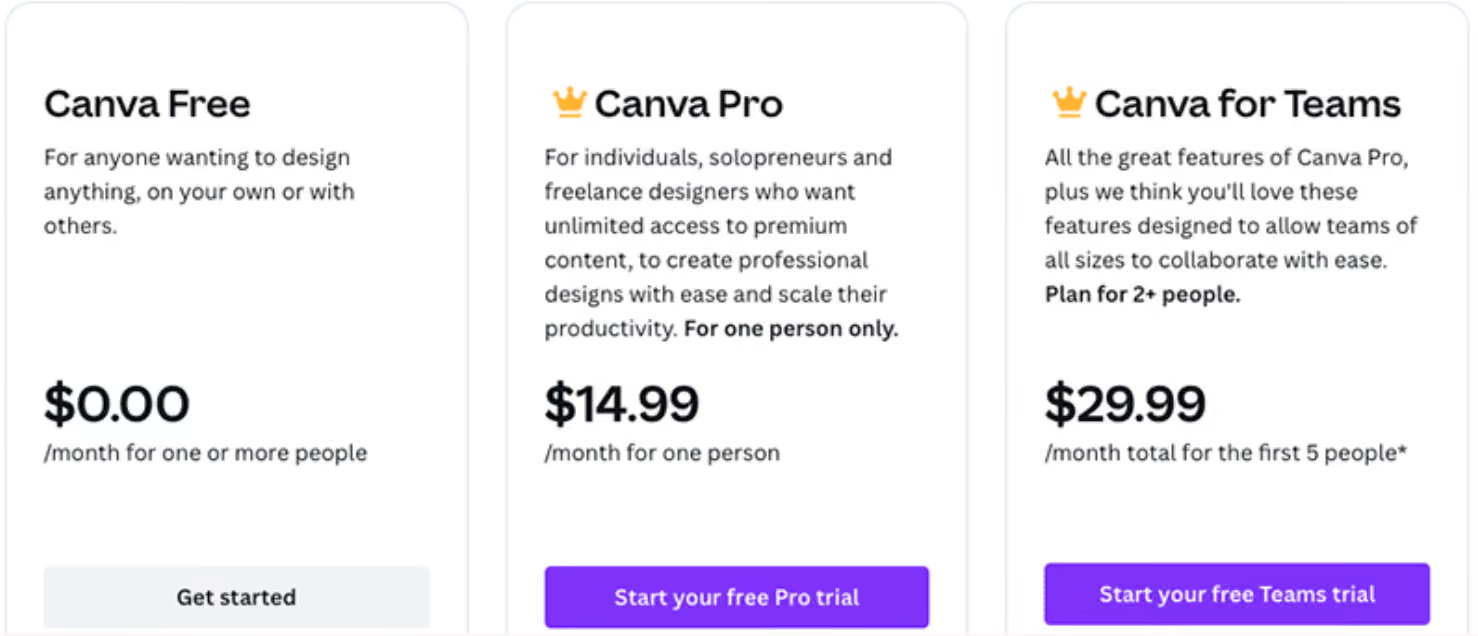
Canva's pricing has moved more in the past two years than most design tools move in five. The old "$12.99 Pro, $14.99 Teams" numbers you'll still see floating around the internet are outdated, Canva has raised prices multiple times since late 2024 and restructured its team plan entirely. Here's what you actually pay as of August 2026. For a full overview of everything else Canva covers beyond pricing, see our Canva learning hub.
In Short: Canva Pricing Right Now
- Canva Free remains genuinely usable, not a stripped demo, with a large template library, basic Magic Studio AI, and 5GB of storage.
- Canva Pro costs roughly $15 to $18 per month billed monthly, or the equivalent of $12 to $15 per month on annual billing, depending on when and where you check, Canva has raised this price more than once since 2024.
- Canva Teams no longer exists as a flat-rate plan. It was rebranded to Canva Business and moved to per-seat pricing, roughly $20 to $25 per user per month, a meaningful jump from the old flat team fee.
- Enterprise is custom-quoted, and at least one recent pricing analysis reports a 150-seat minimum, which pushes mid-size teams toward Business instead.
- A newer cost to watch: Sora-powered premium video generation on Pro and above bills separately, per generation, it's not included in the flat subscription price.
Canva Pricing Plans Overview
Because Canva's pricing keeps shifting, treat the numbers below as a close, recently verified range rather than a fixed rate, and confirm the exact current price on Canva's own pricing page before budgeting around it.
What Changed Since the Old $12.99/$14.99 Pricing
Canva's pricing history over the past two years explains why so many pricing guides online contradict each other. In September 2024, Canva scrapped its old flat-rate Teams plan and moved to per-seat billing. Through 2025 and into 2026, that team plan was rebranded from Teams to Business and repriced again, and Canva Pro itself climbed in stages, from $12.99, to $15, to $18 per month depending on the billing cycle and when you're checking. If you see a page still quoting "$10/user" or "$12.99 Pro" anywhere, including, until now, this one, it predates these changes.
Canva Free: What You Actually Get
The free plan is a real, usable tier, not a locked demo. It includes a large template library, drag-and-drop editing that needs no design background, basic Magic Studio AI features, real-time collaboration and commenting, and 5GB of storage. For students, casual users, and anyone making the occasional graphic or presentation, Free genuinely covers most needs, including everyday tasks like putting together social media posts or a quick YouTube thumbnail.
Canva Pro: What the Upgrade Adds
Pro adds the features most regular creators actually feel the absence of: a Brand Kit with custom colors and fonts, a background remover, Magic Resize to reformat a design across platforms instantly, access to over 100 million premium stock photos, videos, and graphics, and expanded storage. For freelancers, solopreneurs, and anyone publishing content regularly, the background remover and brand kit alone tend to justify the cost by saving real editing time each month, especially if you're producing YouTube thumbnails or social media posts at any real volume, where premium templates and brand consistency start to matter.
Canva Business: The Restructured Team Plan
This is the plan that changed the most. What used to be a flat fee covering a small team is now billed per seat, with pricing in the $20 to $25 per user per month range depending on billing cycle. A 3-person team now pays for 3 individual seats rather than one shared team fee, which is a meaningfully different cost structure than the old model. Business adds shared brand controls, approval workflows, and multi-user administration on top of everything in Pro.
Canva Enterprise: Who It's Actually For
Enterprise pricing is custom-quoted and includes SSO, SCIM provisioning, audit logs, and a dedicated customer success manager. At least one recent pricing analysis reports a 150-seat minimum, which effectively rules it out for mid-size teams, a 40-person team, for example, doesn't have the option to buy Enterprise features and instead stays on Business or over-commits to a minimum it doesn't need.
The New Cost to Watch: AI Video Generation
Canva's Sora-powered premium video generation, available on Pro and above, isn't folded into the flat subscription price. It bills separately, per generation, so a team producing AI-generated video regularly should treat it as its own usage-driven cost rather than assuming it's covered by the base plan.
Frequently Asked Questions
How much does Canva cost in 2026?
Canva Free costs $0. Canva Pro runs roughly $15 to $18 per month depending on billing cycle and timing, with annual billing typically working out to $12 to $15 per month. Canva Business, the renamed Teams plan, costs roughly $20 to $25 per user per month. Enterprise is custom-quoted. These figures shift periodically, so confirm the exact current price on Canva's official pricing page before committing.
Is Canva still free to use?
Yes. The free plan remains genuinely usable, with a large template library, basic AI tools, and 5GB of storage, not just a limited trial.
What happened to Canva Teams?
It was discontinued as a flat-rate plan. Canva moved team pricing to a per-seat model starting in September 2024, then rebranded the plan from Teams to Business during 2025, with per-seat pricing continuing to rise since.
Is Canva Business cheaper than buying multiple Canva Pro accounts?
It depends on team size and how much shared brand control you need. For very small teams, comparing the per-seat Business cost against simply buying separate Pro accounts is worth doing directly, the math has shifted since the old flat-rate Teams plan disappeared.
Does Canva Pro include AI video generation?
Not for free within the subscription. Sora-powered premium video generation is available on Pro and above but bills separately, per generation, on top of the regular subscription price.